
Skip to content
No results
  • Bridging the Gap Home
  • Documentation
  • Video Training
  • Submit a Support Ticket
Bridging the Gap Help Desk
  • Bridging the Gap Home
  • Documentation
  • Video Training
  • Submit a Support Ticket
Bridging the Gap Help Desk
Home Get Started

Footer – How to Edit and Work With It

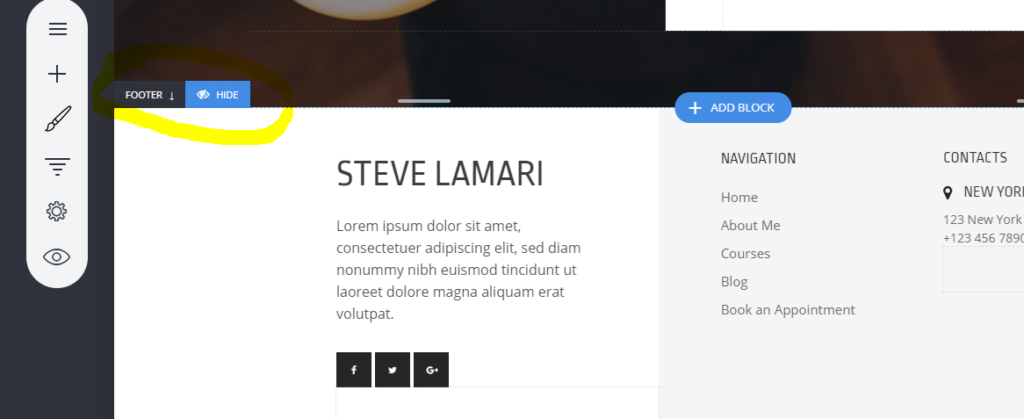
When you scroll to the bottom of your page, you will see your footer area marked with ‘Footer’ and an arrow pointing down indicating where the footer starts from.

Everything that you add in the Footer area will show on all pages that have the footer enabled. To hide the footer for a page, click on the Hide button.
Share to others
Previous Post Uploading Photos and Files
Next Post Move a Website or Funnel to Another Project

Categories

  • Applications
  • Blocks / Containers
  • Booking
  • Customer Data / Privacy (GDPR)
  • Email Marketing and Automations
  • Form
  • Funnels
  • Get Started
  • Members
  • Pages
  • Popups
  • SEO (Search Engine Optimization)
  • Store
  • Website Settings
  • Widgets
Related Articles

Engage – CRM, Messages and Custom Properties

  • Get Started

Adding Pixel, Analytics and Scripts/HTML to Your Pages

  • Get Started

Animations

  • Get Started

Admins – Adding a Contributor or Customer to a Project/Site/Funnel

  • Get Started