Skip to content
No results
  • Bridging the Gap Home
  • Documentation
  • Video Training
  • Submit a Support Ticket
Bridging the Gap Help Desk
  • Bridging the Gap Home
  • Documentation
  • Video Training
  • Submit a Support Ticket
Bridging the Gap Help Desk
Home Get Started

Moving a Funnel or a Website to Another Project

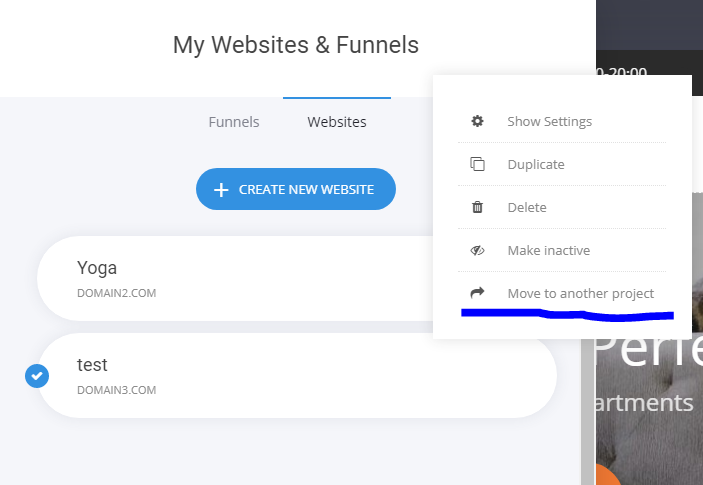
In your builder’s Funnels and Websites section, click on the three dots in the top right corner.

Select Move to another project and select the project where you want to move to.
Share to others
Previous Post Move a Website or Funnel to Another Project
Next Post Duplicating/Cloning a Website or a Funnel

Categories

  • Applications
  • Blocks / Containers
  • Booking
  • Customer Data / Privacy (GDPR)
  • Email Marketing and Automations
  • Form
  • Funnels
  • Get Started
  • Members
  • Pages
  • Popups
  • SEO (Search Engine Optimization)
  • Store
  • Website Settings
  • Widgets
Related Articles

Header Editor & Settings

  • Get Started

Changing a Template – Create a New Website

  • Get Started

Move a Website or Funnel to Another Project

  • Get Started

Tracking Who Fills Your Form, Registers or Checkouts via UTM

  • Get Started